







The Alarm System Cellular Backup Economics Most Dealers Are Getting Wrong
April 2, 2026
Why Your IoT Modem Takes 15 Minutes to Register — And What’s Actually Happening
April 13, 2026
eSIM Provisioning for IoT: What Actually Happens — and Where Deployments Stall
Consumer eSIM activation takes two minutes. IoT eSIM provisioning takes planning. Here’s the difference.
You’ve activated an eSIM on a smartphone before. Scan a QR code, wait thirty seconds, done. It’s reasonable to expect IoT eSIM provisioning to work the same way. It doesn’t — and teams who carry that assumption into a fleet deployment find out the hard way, usually when the support queue fills up with devices that show “connected” but can’t pass data.
This is how eSIM provisioning actually works for IoT, what the common failure points are, and what to standardize before your first device ships.
What You’re Actually Dealing With
An eSIM (embedded SIM) is a SIM chip soldered directly onto the circuit board rather than inserted as a removable card. The chip — formally called an eUICC (embedded Universal Integrated Circuit Card) — can store one or more connectivity profiles that are downloaded and managed remotely, without physical access to the device.
For IoT, this matters practically: devices in sealed enclosures, remote field locations, or high-volume manufacturing lines can’t be easily accessed for a physical SIM swap. eSIM removes that constraint and eliminates the mechanical failure risk that comes with SIM trays and removable cards.
What eSIM doesn’t change is the need for correct provisioning. A chip soldered to a board is inert until a carrier profile is loaded, the right APN (Access Point Name) is configured, and the device is told to use it. The chip being embedded doesn’t make that setup automatic.
The Three-Step Sequence That Has to Go Right
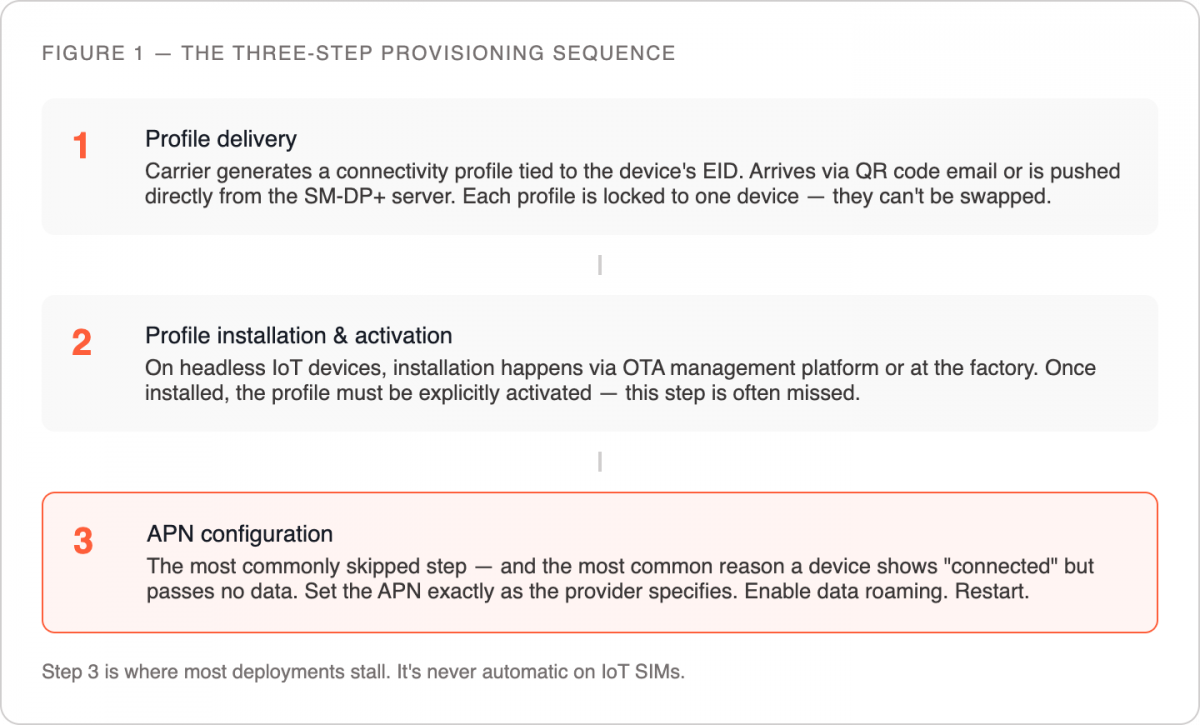
Every IoT eSIM activation follows the same sequence, regardless of hardware vendor or carrier.
Profile delivery. When you purchase an eSIM plan, the carrier generates a connectivity profile — credentials that tell the network who the device is and what it’s authorized to access. For IoT eSIMs, this profile typically arrives as a QR code to your account email, or is provisioned directly via an SM-DP+ server (the infrastructure that manages profile downloads). If your order involves multiple eSIMs, each gets a unique credential tied to a specific eUICC identifier (EID). These cannot be interchanged between devices.
Profile installation and activation. On devices with a display and operating system, you scan the QR code through cellular settings and the device downloads the profile from the SM-DP+ server. On headless IoT devices — no screen, no UI — profile installation happens through an over-the-air management platform or during manufacturing, before shipment. Once the profile is installed, it needs to be explicitly activated: automatically on some devices, manually or via API call on others.
APN configuration. The APN is a gateway identifier that routes the device’s data traffic through the correct carrier infrastructure. IoT SIM APNs are provider-specific and won’t be auto-populated the way consumer carrier APNs are. Skipping or misconfiguring this is the single most common reason a device appears activated but produces no data connection — the device associates with a tower, but traffic has nowhere to route. Set the APN exactly as the provider specifies, enable data roaming, restart the device.
The Dual-IMEI Question
A question that surfaces in nearly every IoT eSIM deployment: why does the device show two IMEI numbers?
The IMEI (International Mobile Equipment Identity) is assigned to a radio interface, not to the device as a whole. A device with both a physical SIM slot and an embedded eSIM has two radio interfaces and therefore two IMEIs — one tied to the physical SIM slot, one to the eSIM. The labeling order varies by hardware manufacturer and is typically printed on the packaging or accessible through device settings under “About” or “Device Information.”
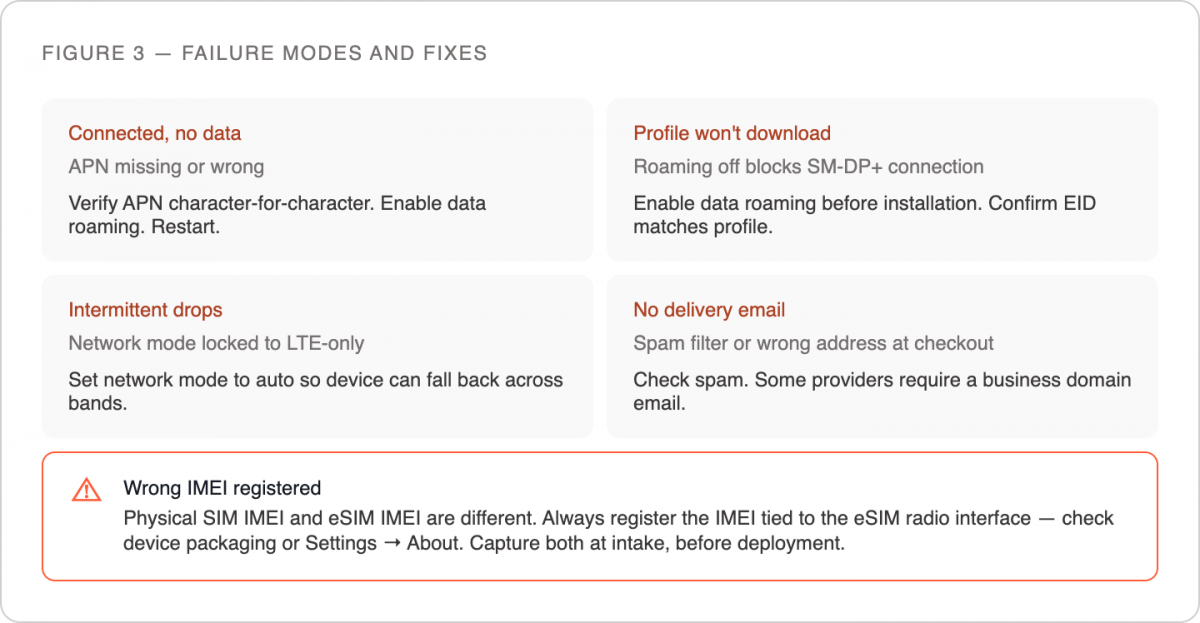
When registering an eSIM with a carrier or logging it in a device management platform, use the IMEI tied to the eSIM interface specifically. Capture both IMEIs at intake alongside the EID. Associating profiles to devices retroactively — after they’re deployed in the field — is significantly harder than doing it before they leave the warehouse.
IoT eSIM vs. Consumer eSIM: The Differences That Matter
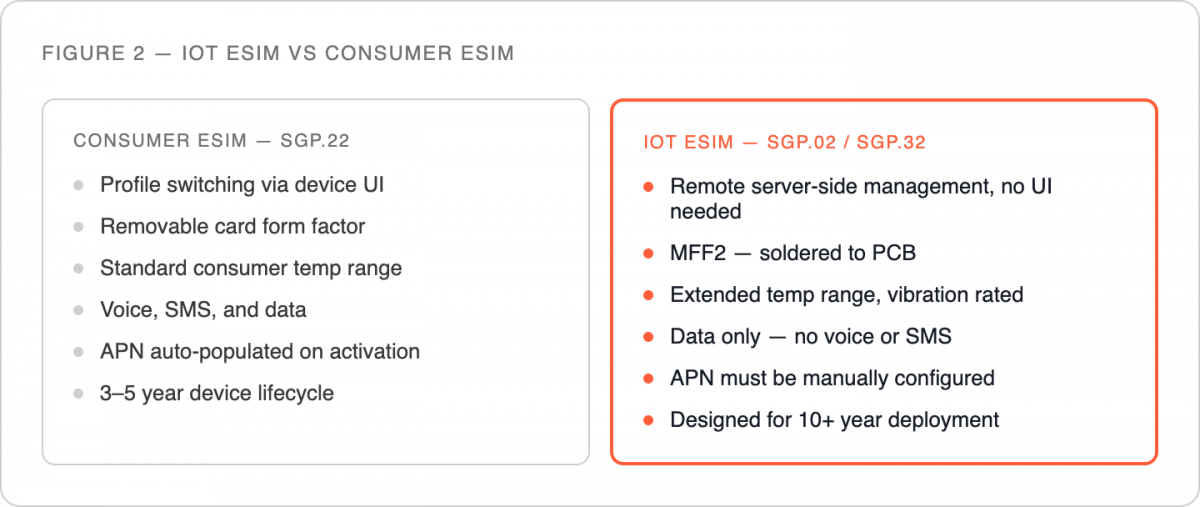
Consumer eSIM specs (GSMA SGP.22) are designed around end-user switching between carriers through a device UI. Industrial IoT eSIM specs (GSMA SGP.02) are designed for remote, server-side profile management — suited to devices with no interface and deployments that require centralized provisioning across thousands of units. Understanding which spec your hardware implements determines what your management options are at scale.
Form factor is another distinction worth flagging. Consumer eSIMs use standard removable card form factors. IoT eSIMs are most commonly MFF2 (Machine Form Factor 2) — soldered, rated for extended temperature ranges, vibration tolerance, and 10+ year service life. The hardware is built for conditions that would destroy a removable card.
One more distinction worth stating plainly: IoT SIMs from dedicated providers are provisioned for data connectivity only. They don’t support voice or SMS the way consumer SIMs do. A device that needs to receive an SMS — for two-factor authentication, for example — is not a valid use case for an IoT data SIM, embedded or otherwise.
The Failure Modes Worth Knowing Before You Hit Them
Device shows connected, no data. APN issue, almost always. Verify it character-for-character against what the provider specifies, including any region-specific subdomain (e.g., us.provider.iot versus eu.provider.iot). Confirm data roaming is enabled.
QR code won’t scan or profile fails to download. Check that data roaming is enabled before attempting profile installation — some devices block the SM-DP+ server connection when roaming is off. Confirm the device’s EID matches the profile you’re installing; a mismatch fails silently on some hardware.
Connection drops intermittently after activation. Often a network registration issue. IoT SIMs operating on multi-carrier agreements roam between networks; if the device’s network mode is set to LTE-only in an area with inconsistent LTE coverage, it won’t fall back automatically. Set network mode to auto.
Profile delivery email never arrived. QR codes go to the account email used at checkout. Check spam. Some providers require a business domain email and won’t process orders from personal addresses.
What to Standardize Before You Scale
Resolving provisioning issues one device at a time works at five units. At 100 it becomes the main job. These practices prevent that:
Bake the APN into your device firmware. Don’t configure it manually at activation. The correct APN, roaming settings, and network mode preferences should be part of your device image so every unit ships pre-configured.
Log EIDs and IMEIs at intake. When hardware arrives, capture both before devices go into storage or ship to field sites. This takes minutes now and saves hours later.
Use a device management platform for profile operations. For any fleet above a handful of devices, managing eSIM profiles through a portal or API — rather than individual QR code scans — gives you activation status visibility, remote profile update capability, and an audit trail if something goes wrong.
Test in the target environment before full rollout. Signal behavior in a lab or office is not signal behavior on a rooftop, inside a metal enclosure, or in a rural area. Activate and stress-test a representative sample in the actual deployment environment before committing to a full rollout.
The teams that provision eSIM successfully at scale aren’t doing anything exotic — they’re standardizing configuration, logging identifiers early, and testing under realistic conditions before they ship. That groundwork is what separates a clean activation from a support queue. If you want to validate the process before committing to a production order, request a Simplex trial SIM — it’s the fastest way to verify your stack before you scale.
This article was curated by Jan Lattunen, CCO Simplex Wireless
About the Author: Jan Lattunen manages Sales and Marketing for Simplex Wireless. Jan has 20 years’ experience in working with SIM card technology and was involved in launching the eSIM in North America with major carriers and OEMs. His expertise in telecommunications is around SIM cards. On a personal note, Jan is a family man and avid cyclist with advocacy for safety in the roads. You can connect with Jan on https://linkedin.com/in/JanLattunen