







Why Your IoT Modem Takes 15 Minutes to Register — And What’s Actually Happening
April 13, 2026
Does Your IoT Device Need a Public IP Address?
April 20, 2026
What Is an ICCID? The SIM Card Identifier Every IoT Developer Needs to Know
You’ll need it to troubleshoot a connection, process a top-up, and identify any SIM in your fleet. Here’s what it is, what every digit means, and where to find it.
ICCID stands for Integrated Circuit Card Identifier. It’s the unique serial number assigned to every SIM card in the world — a string of 19 to 20 digits that identifies that specific card, not the device it’s in, not the subscriber using it, but the physical card itself. When you contact your connectivity provider about a SIM that won’t connect, the first thing they’ll ask for is the ICCID. When you top up a prepaid SIM, you need the ICCID to link the purchase to the right card. When you look up a device in a management portal, you find it by ICCID. It’s the most operationally important number on your SIM card — and most people only learn what it is the first time something goes wrong.
What Every Digit in an ICCID Actually Means
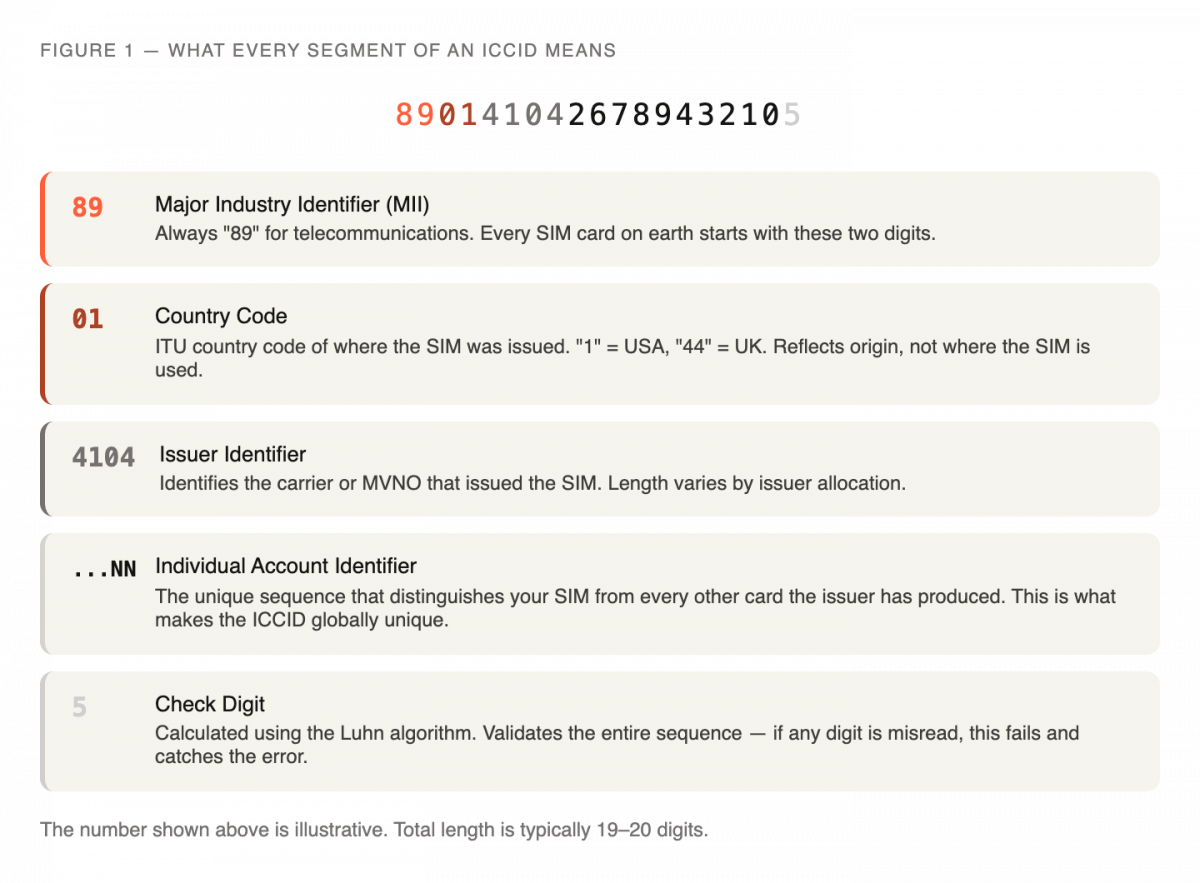
An ICCID looks like a random 19- or 20-digit number. It isn’t. Each segment encodes specific information about the card’s origin, issuer, and identity, following a structure defined by the ITU-T E.118 standard.
Digits 1–2: Major Industry Identifier (MII). These are always “89” for telecommunications SIM cards. Every SIM card on the planet — IoT, consumer, M2M — starts with 89. It’s the industry-level classification that tells the system what type of card this is.
Digits 3–4: Country Code. These identify the country where the SIM was issued, using ITU calling codes. A SIM issued in the United States carries “1.” A UK-issued SIM carries “44.” This reflects where the card originates, not where it’s used — a global roaming SIM issued in the US still shows “1” regardless of where in the world it connects.
Digits 5 onward: Issuer Identifier. This segment identifies the specific carrier or MVNO (Mobile Virtual Network Operator) that issued the SIM. The length varies depending on the issuer’s allocation.
Remaining digits: Individual Account Identifier. This is the unique sequence that distinguishes your SIM from every other card issued by the same operator. It’s what makes the ICCID globally unique.
Final digit: Check Digit. Calculated using the Luhn algorithm — the same mathematical check used on credit card numbers — this single digit validates the integrity of the entire sequence. If a digit has been misread or transcribed incorrectly, the check digit fails, catching the error before it causes a connection or account problem.
ICCID vs IMSI vs IMEI — Three Identifiers, Three Different Things
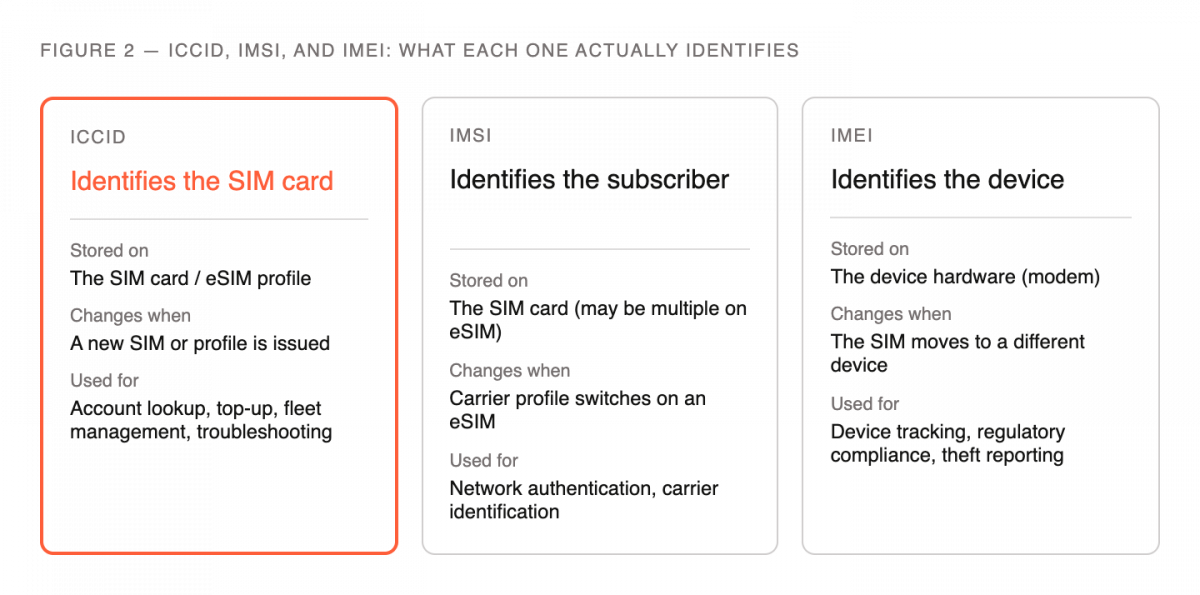
These three abbreviations appear together constantly in IoT connectivity, and they’re frequently confused. They serve entirely different purposes.
The ICCID identifies the SIM card itself — the physical card or eSIM profile. It doesn’t change when the card moves between devices. It doesn’t change when the network changes. It’s the serial number of the card.
The IMSI (International Mobile Subscriber Identity) identifies the subscriber — the network account associated with a SIM. Where the ICCID is the card’s serial number, the IMSI is its network credential. On a standard SIM, ICCID and IMSI are paired one-to-one. On a multi-profile eSIM, a single ICCID can carry multiple IMSIs — one per carrier profile — which is what enables over-the-air carrier switching without changing the physical hardware.
The IMEI (International Mobile Equipment Identity) identifies the device — the modem or hardware the SIM is inserted into. The IMEI has nothing to do with the SIM. If you move a SIM from one device to another, the ICCID stays the same and the IMEI changes. This is why most IoT SIM providers, including Simplex, don’t require IMEI registration — the SIM connects based on its own credentials, not the device’s hardware identity.
How the ICCID Is Used in IoT Fleet Management
In any SIM management platform, the ICCID is the primary key — the identifier everything else hangs off. In the Simplex portal, Device Management is organized by ICCID. When you look up a device’s connectivity status, data consumption, real-time network registration, or current IP address, you navigate there via ICCID. When you activate, pause, or deactivate a SIM, the action is applied to a specific ICCID. When Simplex’s support team looks up your account, the ICCID is what they search for.
This matters in practice for three common situations. First, troubleshooting: if a device isn’t connecting, the ICCID is what links your hardware to the account record and lets the provider see what’s happening on the network side. Second, top-up: if you’re extending a prepaid SIM, you need the ICCID to associate the purchase with the right card. Third, fleet inventory: in a deployment with dozens or hundreds of devices, ICCID is the reference that lets you track which SIM is in which device, what state it’s in, and how much data it’s consumed.
Where to Find Your ICCID
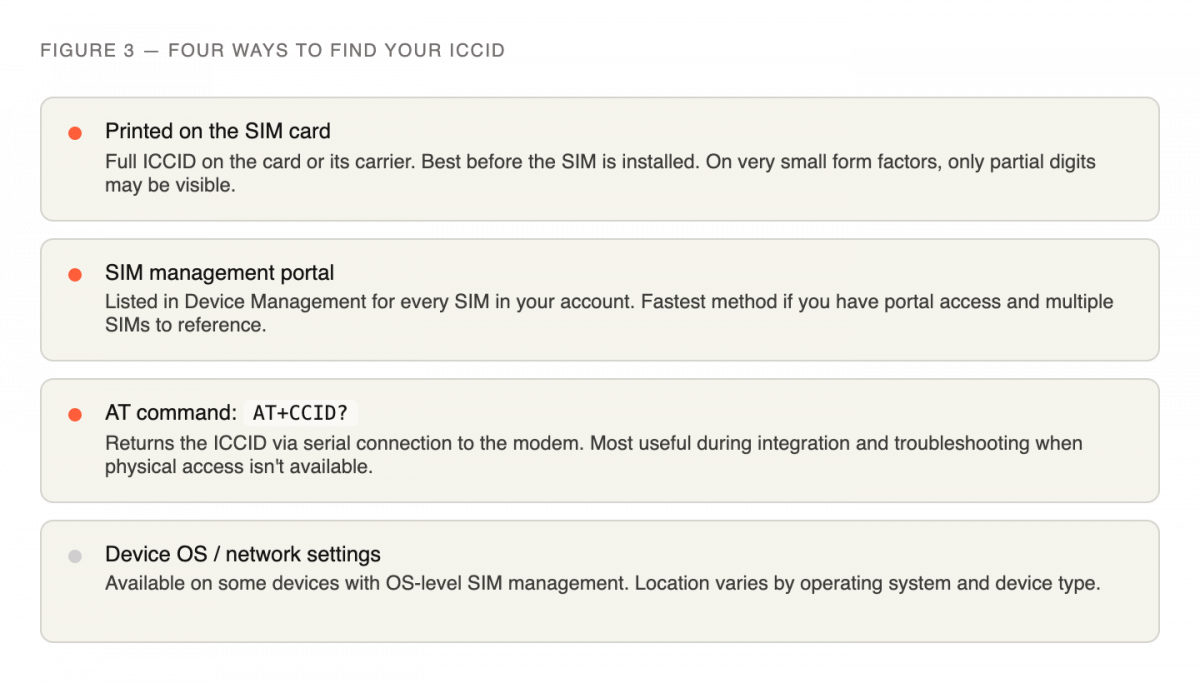
There are four ways to retrieve an ICCID, depending on what you have access to.
Printed on the physical SIM card. The full ICCID is printed on the card itself — usually on the back of the larger card carrier it ships attached to. On very small form factors like nano SIMs (4FF) where space is limited, sometimes only the last 13 digits are printed, with the full number requiring an electronic read.
In your SIM management portal. Once a SIM is in your Simplex account, the ICCID appears in Device Management. This is the fastest way to look it up if you have portal access and just need to reference it.
Via AT command from the modem. If the SIM is already installed in a device and you have serial access to the modem, the command AT+CCID? returns the ICCID directly. This is useful during integration and troubleshooting when you need to confirm which SIM is active without physically accessing the hardware. A full list of useful AT commands for IoT connectivity is available on the Simplex site.
From the operating system on compatible devices. On some devices with OS-level cellular management, the ICCID is visible in network or SIM settings.
ICCID and eSIM — What Changes
When a SIM is physical, there’s a simple one-to-one relationship: one card, one ICCID. eSIM introduces a layer of complexity worth understanding.
An eUICC (Embedded Universal Integrated Circuit Card) — the chip that enables eSIM — has its own separate identifier called an EID (eUICC Identifier). The EID identifies the hardware chip, not the profile stored on it. The ICCID still identifies the active profile. On an eSIM, when you switch carrier profiles over the air, the EID stays constant — it’s the same chip — but the active ICCID changes, because a new profile with its own ICCID has been downloaded and enabled.
For fleet management, this means you track the EID to identify the hardware and the active ICCID to identify what’s currently running on it. In the Simplex xoSIM platform, both are visible in the management interface, giving you a complete view of which carrier profile is active on each physical chip across your fleet.
The ICCID is the first identifier you need and the one you’ll reference most throughout a deployment. Keep it accessible — note it before a SIM goes into a device, confirm it’s in your portal before you need it for a support conversation, and learn the AT command to retrieve it remotely from an installed modem. The two minutes that takes will save you the longer conversation later. If you’re ready to get your first SIM cards in hand, the Simplex IoT data SIM ships with the ICCID printed and ready to register.
This article was curated by Jan Lattunen, CCO Simplex Wireless
About the Author: Jan Lattunen manages Sales and Marketing for Simplex Wireless. Jan has 20 years’ experience in working with SIM card technology and was involved in launching the eSIM in North America with major carriers and OEMs. His expertise in telecommunications is around SIM cards. On a personal note, Jan is a family man and avid cyclist with advocacy for safety in the roads. You can connect with Jan on https://linkedin.com/in/JanLattunen