







What Is an ICCID? The SIM Card Identifier Every IoT Developer Needs to Know
April 17, 2026
When Your PTT Radio Is Also a Web Browser: Managing Data on Android Field Devices
April 23, 2026
Does Your IoT Device Need a Public IP Address?
Most engineers ask for one. Most IoT devices don’t need one — and asking for it can send your deployment in the wrong direction before it starts.
The assumption is understandable. If you need to reach a device remotely — send it a command, pull data from it, check its status — the mental model most engineers bring from web development or server infrastructure says: you need an IP address. Specifically, a public one that’s reachable from the open internet. Static, if you want it to be reliable.
That model is correct for servers. For IoT devices running on cellular SIMs, it’s the wrong frame entirely, and it leads to real problems in the field.
What a Public IP Address Actually Is
An IP address — Internet Protocol address — is the numerical label assigned to a device on a network. Private IP addresses (ranges like 192.168.x.x or 10.x.x.x) are used within local networks and aren’t reachable from the internet. Public IP addresses are routable on the open internet — any device with one can, in principle, be reached from anywhere.
A static IP is a public IP that doesn’t change between sessions. A dynamic IP is a public IP that may be reassigned each time the device connects. Both are public and reachable; the difference is predictability.
When you buy a SIM card from a consumer carrier and it connects to the internet, it typically receives a private IP address behind carrier-grade NAT (Network Address Translation). The carrier’s infrastructure handles routing, and your device is not directly reachable from the open internet. That’s by design — it’s the same reason your home router assigns private IPs to your laptop and phone.
IoT SIM providers operate the same way by default. Your device gets a private IP. Carrier infrastructure handles NAT. The device can reach the internet; the internet cannot directly reach the device.
This is where most engineers hit a wall and ask the question: “Do you offer public or static IPs?”
Why This Gets IoT Deployments Into Trouble
The instinct to ask for a public IP comes from a legitimate need: you need two-way communication with your device. You want to push a firmware update, send a command to switch a relay, or poll the device for its current sensor reading. If the device only has a private IP behind NAT, how do you reach it?
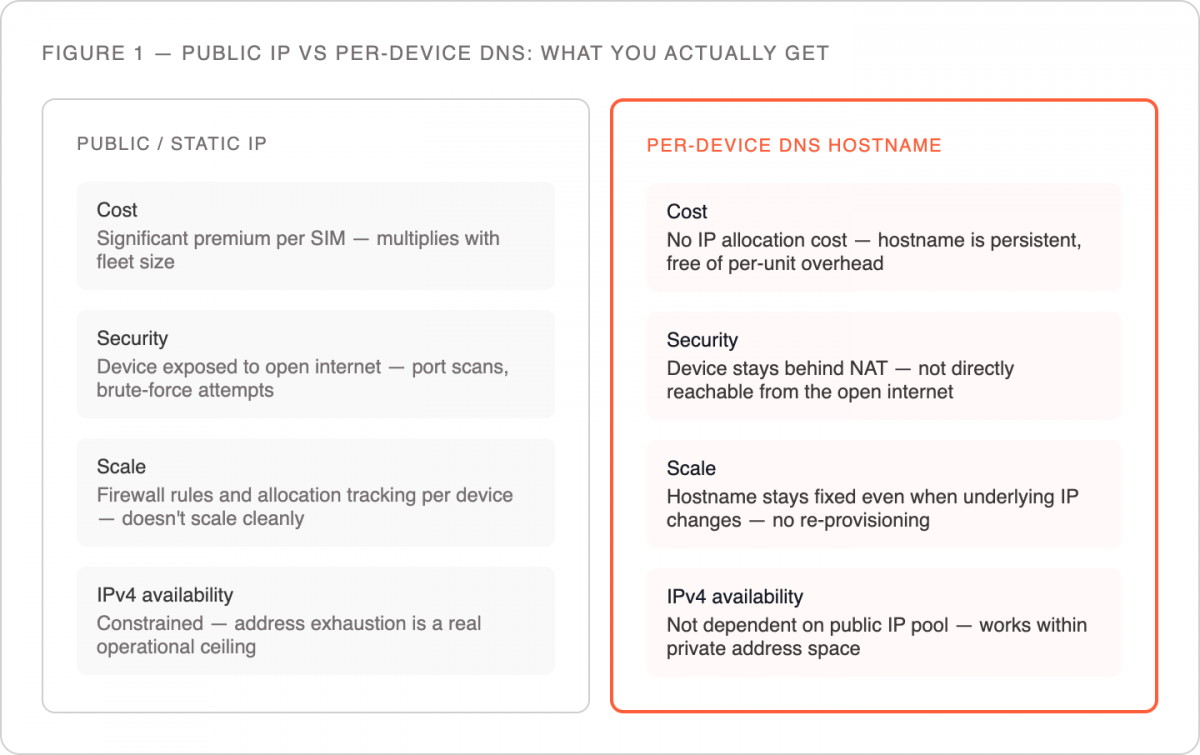
The problem is that public IP allocation at scale is expensive, operationally complex, and increasingly constrained by IPv4 address exhaustion. A provider that offers static public IPs for IoT SIMs is either charging significantly for it or cutting corners elsewhere to absorb the cost. For a fleet of 12 modems transmitting light-switch commands in Montreal, paying for 12 static public IPs is like renting a warehouse to store a filing cabinet.
There’s also a security dimension. Devices with public IPs are directly exposed to the internet. Every port scan, brute-force attempt, and automated exploit probe can reach them. An industrial modem controlling physical infrastructure with a public IP and default credentials is a headline waiting to happen.
Beyond cost and security, there’s a practical ceiling: if you’re managing hundreds or thousands of devices across multiple countries, static IP management becomes its own infrastructure problem. Tracking allocations, managing firewall rules per IP, handling re-provisioning when a device is replaced — none of this scales cleanly.
What to Do Instead: Per-Device DNS Routing
The cleaner approach — and the one purpose-built IoT connectivity providers use — is to assign each SIM or device its own unique URL (Uniform Resource Locator) or DNS hostname rather than a public IP address.
Here’s how it works in practice. Your device connects to the cellular network and receives a private IP. The connectivity platform maps that device to a persistent, unique hostname — something like device-a3f7.yourprovider.iot. When the underlying IP changes (because the device reconnected, moved networks, or was power-cycled), the DNS record updates automatically. From your application or management system, you always reach the device at the same address, regardless of what’s happening at the IP layer underneath.
This approach solves the remote access problem without exposing devices to the open internet, without the cost of public IP allocation, and without the operational overhead of managing static IP assignments across a fleet.
For the meteorologist deploying three weather stations, this means each modem has a stable, reachable endpoint for data collection and remote configuration — no public IP required. For the facilities manager remotely switching lights in Montreal, each of the 12 modems is addressable through the platform without requiring a public IP for each one.
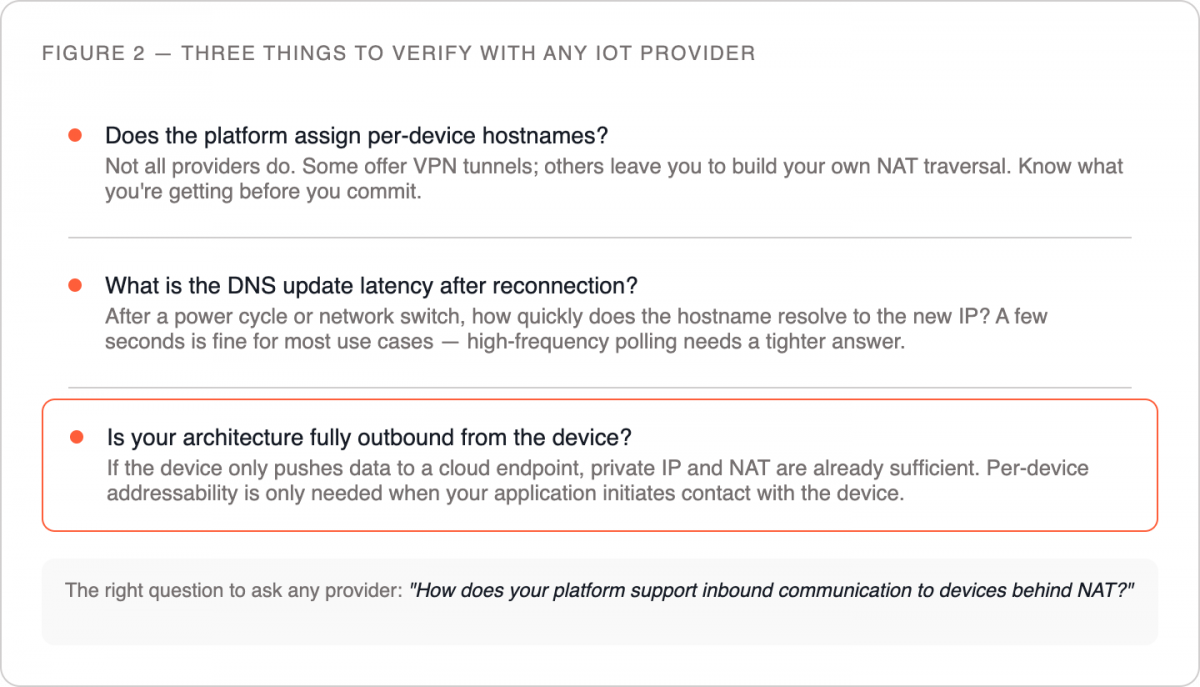
Ask whether the platform assigns per-device hostnames. Not all providers do. Some offer VPN tunnels as an alternative; others offer nothing and leave engineers to build their own NAT traversal. Know what you’re getting before you commit.
Confirm the DNS update latency. When a device reconnects after a power cycle or network switch, how quickly does the hostname resolve to the new private IP? For most command-and-control applications, a few seconds is acceptable. For high-frequency polling, it matters more.
Check whether the device-to-cloud direction is already covered. In many IoT deployments, the device is the sender — it pushes data to a cloud endpoint on a schedule. That direction works fine with private IPs and NAT. The DNS hostname approach is primarily needed when your application needs to initiate contact with the device. If your architecture is fully outbound from the device, you may not need addressability at all.
Two Misconceptions Worth Clearing Up
“Dynamic IP just means the IP changes — that’s fine for IoT.” The phrase “dynamic IP” means different things depending on context. In consumer broadband, it means your public IP may change between sessions but is still publicly routable. In IoT cellular, it usually means the device has a private IP behind NAT that changes — which means it’s not directly reachable at all, regardless of how often it changes. When a buyer asks for “dynamic IP support,” they often mean “I want the device to have a reachable address that doesn’t have to be static.” That’s the DNS hostname problem, not a dynamic vs. static IP problem.
“If the provider doesn’t offer public IPs, I can’t do two-way communication.” This isn’t true. Per-device DNS, VPN tunnels, and MQTT (Message Queuing Telemetry Transport) broker architectures all enable two-way communication over cellular without public IPs. The question is which approach fits your architecture and what the provider supports.
The Right Question to Ask
Instead of “do you offer public or static IPs?”, the more useful question for most IoT deployments is: “How does your platform support inbound communication to devices behind NAT?”
The answer will tell you what your options are — DNS hostnames, VPN, broker-based messaging, or something else — and whether the provider has actually thought through the problem or is just selling you a pipe.
If remote device access is a requirement for your deployment, explore how Simplex handles per-device addressability — or reach out to the team to walk through your specific architecture.
This article was curated by Jan Lattunen, CCO Simplex Wireless
About the Author: Jan Lattunen manages Sales and Marketing for Simplex Wireless. Jan has 20 years’ experience in working with SIM card technology and was involved in launching the eSIM in North America with major carriers and OEMs. His expertise in telecommunications is around SIM cards. On a personal note, Jan is a family man and avid cyclist with advocacy for safety in the roads. You can connect with Jan on https://linkedin.com/in/JanLattunen