







Coverage Maps Lie: How to Actually Verify IoT Cellular Coverage Before You Deploy
July 20, 2026
What Is In-Factory Profile Provisioning, and Why Should IoT Manufacturers Care?
August 3, 2026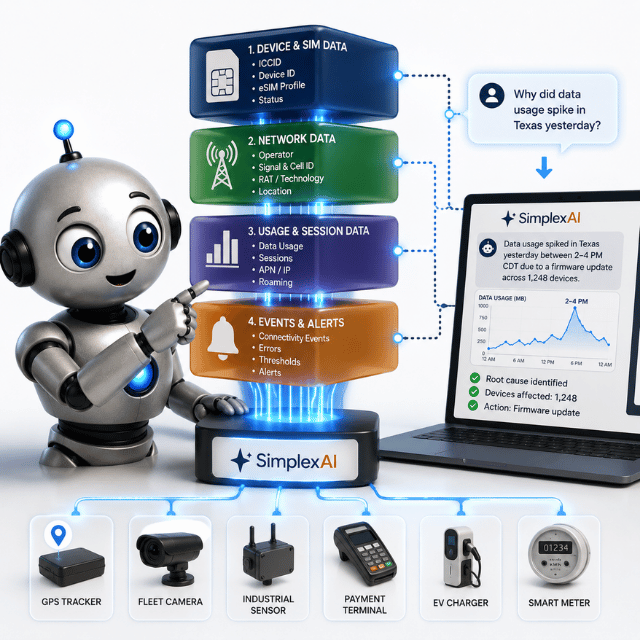
Understanding what SimplexAI actually queries helps you ask better questions — and know exactly what the answers mean.
Most IoT management platforms give you access to the same underlying data: session records, device identifiers, carrier assignments, coverage tables. The difference with SimplexAI isn’t what data it has access to. It’s how you get to it. This guide breaks down the specific data layers SimplexAI queries, how it differs architecturally from a traditional portal, and where its boundaries are — because knowing the limits is as useful as knowing the capabilities.
The Four Data Layers SimplexAI Queries
SimplexAI sits above four distinct data layers within the Simplex platform. Each layer answers a different class of question.
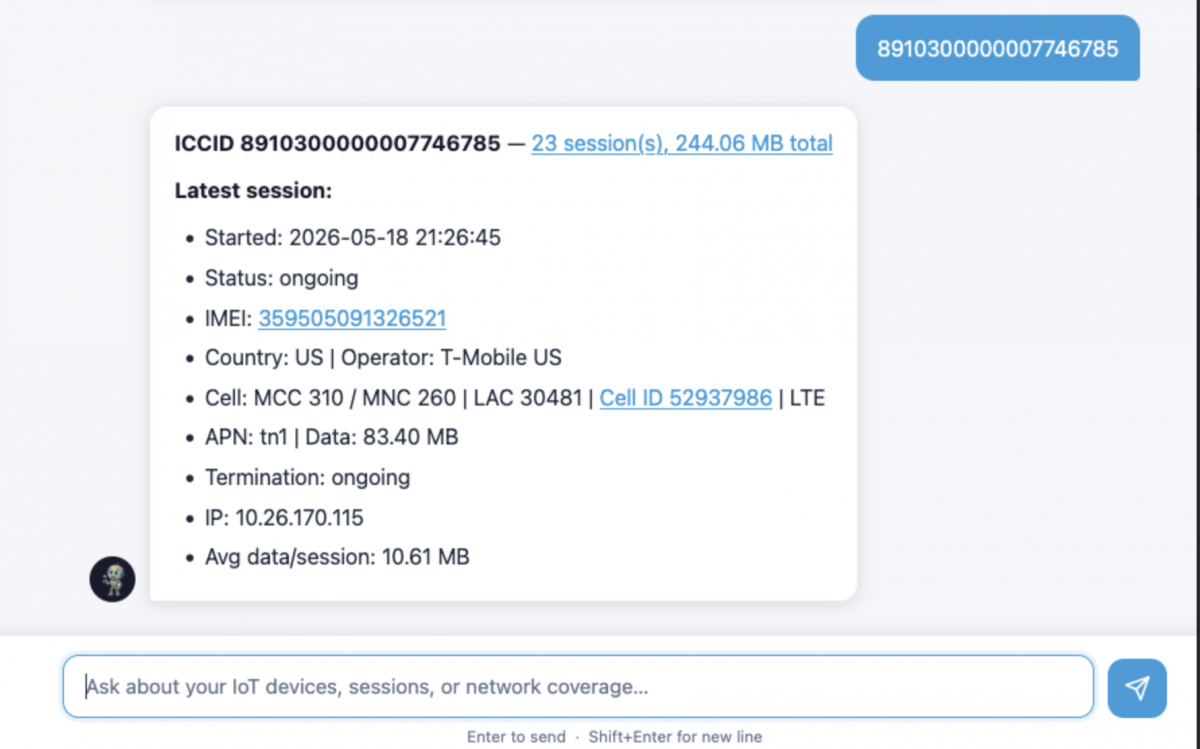
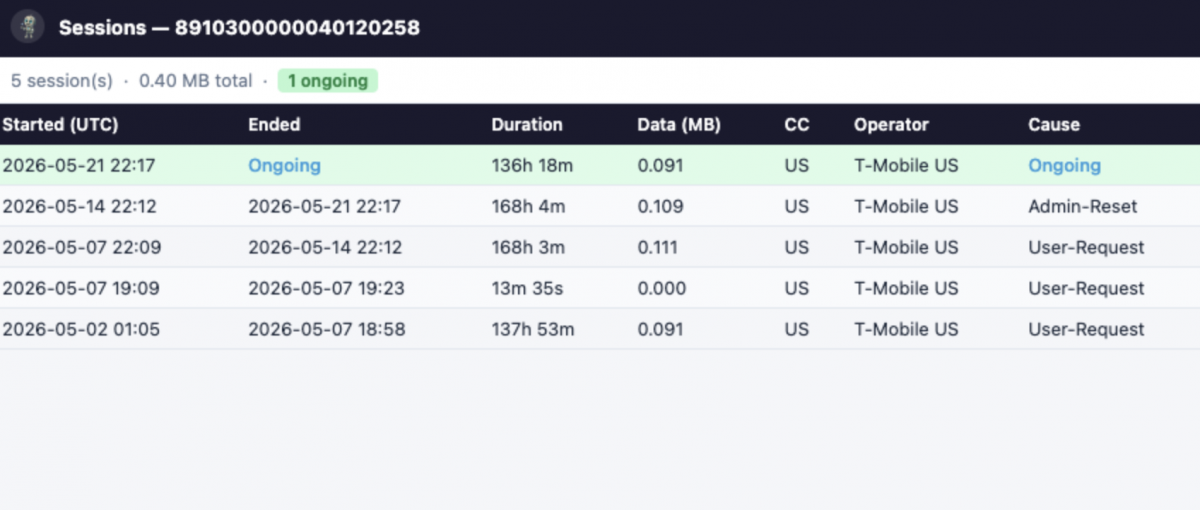
Session data. This is the most frequently queried layer. Every time a SIM-connected device establishes or terminates a data session, the platform records the start time, end time, duration, bytes transferred, termination cause, operator, country code, APN (Access Point Name), IP address, and LAC (Location Area Code). SimplexAI has access to up to 30 days of this history and to live session state — which means questions like “how many sessions are ongoing right now” and “what did this device’s last session look like” both draw from the same layer, at different time horizons.
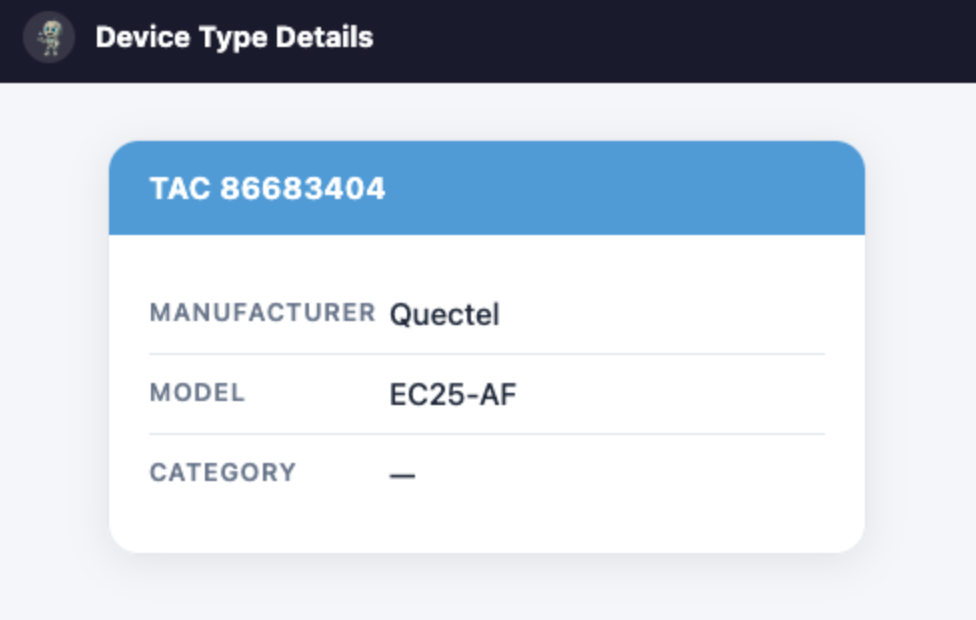
Device intelligence. Each ICCID (Integrated Circuit Card Identifier) in your account is associated with device-level data: the IMEI (International Mobile Equipment Identity) of the hardware it’s installed in, and the TAC (Type Allocation Code) — the first eight digits of the IMEI, which identify the manufacturer and model of the device. SimplexAI uses the TAC to resolve device type details, which is how a question like “what modem is this SIM installed in” returns a manufacturer name and model rather than just a raw identifier. For deployments with mixed hardware — multiple modem types across one account — this layer is what makes per-device-type analysis possible.
Carrier coverage intelligence. This layer covers technology support by operator across 100+ carriers worldwide. It answers questions about which networks support LTE-M (Long-Term Evolution for Machines), LTE, 4G, 5G, NB-IoT (Narrowband IoT), and other radio access technologies in a given country or region. This is static reference data, not live signal measurement — an important distinction covered in Section 4.
Cell tower location. When a session record includes a Cell ID alongside an MCC (Mobile Country Code) and MNC (Mobile Network Code), SimplexAI can resolve that combination to approximate geographic coordinates and render a map pin. MCC identifies the country, MNC identifies the specific operator within that country, and Cell ID identifies the individual base station. Combined, they form a Cell Global Identity — a globally unique identifier for a specific cell tower. The accuracy of the location depends on the cell radius, which varies by tower density and radio access technology.
How This Differs From the Portal Approach
The Simplex portal is built around navigation intent — you go to the sessions view to see sessions, the device view to see device details, the coverage map to check carrier support. Each view is optimized for browsing and configuration. You can get to any piece of data, but you arrive at it through a structured path.
SimplexAI is built around query intent. You describe what you want to know, and the system resolves which data layer or combination of layers answers the question. “Which SIM used the most data last week” doesn’t require you to know where data consumption is displayed or how to sort it — the query itself is the navigation.
The practical difference is most apparent for cross-layer questions. Asking “which active devices are on T-Mobile US and consuming more than 100 MB” combines session data (activity state, data volume), carrier assignment (operator name), and device inventory (account membership) in a single query. In the portal, answering that question requires at least two separate views and a manual comparison. SimplexAI resolves it as a single response.
For large-scale IoT deployments where manual oversight becomes impractical at device counts above a few hundred, the difference between navigating to data and asking for it compounds significantly. The portal remains the right tool for configuration tasks — activating SIMs, adjusting data plans, managing account settings. SimplexAI is optimized for the operational question layer that sits above configuration.
What This Means in Practice for Engineers and PMs
A few things are worth knowing before you start using SimplexAI in an operational workflow.
Query specificity improves answer precision. “Show me active devices” returns everything currently online. “Show me active devices on Vodafone in Germany consuming more than 50 MB in the last 24 hours” returns a filtered subset. The system handles both, but specific queries return more actionable results. If you’re triaging an incident, include the time window, the carrier, and the country in the question where you know them.
Termination causes are logged but not interpreted. SimplexAI returns the raw termination cause from the session record — “Admin-Reset,” “User-Request,” “Network-Reset,” and so on. These are carrier-reported values. SimplexAI can tell you which cause appears most frequently across a device’s session history, but determining whether a given cause is expected for your deployment context is an engineering judgment, not something the system infers. Understanding how eSIM provisioning affects session behavior helps contextualize what you’re seeing.
Anomaly detection flags changes in pattern, not absolute thresholds. When SimplexAI surfaces a traffic anomaly, it’s identifying a deviation from recent baseline behavior for that device or fleet segment — not a breach of a preconfigured rule. This is useful for catching unexpected shifts. It’s not a substitute for explicit usage alerts if you have hard data limits that require enforcement. For M2M deployments at scale, both are worth having in parallel.
AT command-level troubleshooting is separate. SimplexAI operates at the platform data layer. For device-side diagnostics — confirming APN configuration, reading IMEI from firmware, checking PLMN selection — AT command-level access to the modem is still the right tool. SimplexAI tells you what the platform sees. The modem’s AT interface tells you what the hardware is doing. They answer different questions.
Where It Goes Wrong
Four boundaries are worth understanding before you rely on SimplexAI in production.
The 30-day session window is a hard limit. Historical data beyond 30 days is not queryable. If your troubleshooting or audit requirements extend further back, that data needs to be pulled through the Simplex API and stored externally before the window closes.
Coverage data describes operator capability, not live signal. When SimplexAI tells you Vodafone supports LTE-M in Germany, that’s drawn from carrier capability data — the technology the operator has deployed and supports on their network. It doesn’t reflect live signal strength, current network congestion, or whether a specific cell tower in a specific location is functioning at this moment. Confusing these two is the most common misread of coverage query results.
Cell tower coordinates are approximate. The location resolved from an MCC/MNC/Cell ID combination reflects the registered position of the tower with an accuracy range that depends on the tower’s cell radius — typically a few hundred meters in dense urban areas, potentially several kilometers in rural deployments. This is adequate for fleet-level geographic awareness. It’s not adequate for precise asset location.
Query ambiguity produces the nearest reasonable interpretation. If you ask “show me devices with problems,” SimplexAI will return devices with anomalous session patterns or recent termination events — its best interpretation of “problems.” If you mean something specific — devices offline for more than 12 hours, or devices with more than three Admin-Reset terminations in 24 hours — ask that precisely. Vague queries produce valid but potentially incomplete results.
SimplexAI doesn’t change what data your fleet generates. It changes how quickly your team can get to it and act on it. For technical teams who want to explore what’s possible before a full rollout, the Simplex engineering team is available to walk through specific use cases — start the conversation at simplexwireless.com.
This article was curated by Jan Lattunen, CCO Simplex Wireless
About the Author: Jan Lattunen manages Sales and Marketing for Simplex Wireless. Jan has 20 years’ experience in working with SIM card technology and was involved in launching the eSIM in North America with major carriers and OEMs. His expertise in telecommunications is around SIM cards. On a personal note, Jan is a family man and avid cyclist with advocacy for safety in the roads. You can connect with Jan on https://linkedin.com/in/JanLattunen