







How to Choose a Natural Language Interface for IoT Network Data: A Buyer’s Guide
September 8, 2026
Cellular vs Wi-Fi for EV Chargers: Which Wins?
September 11, 2026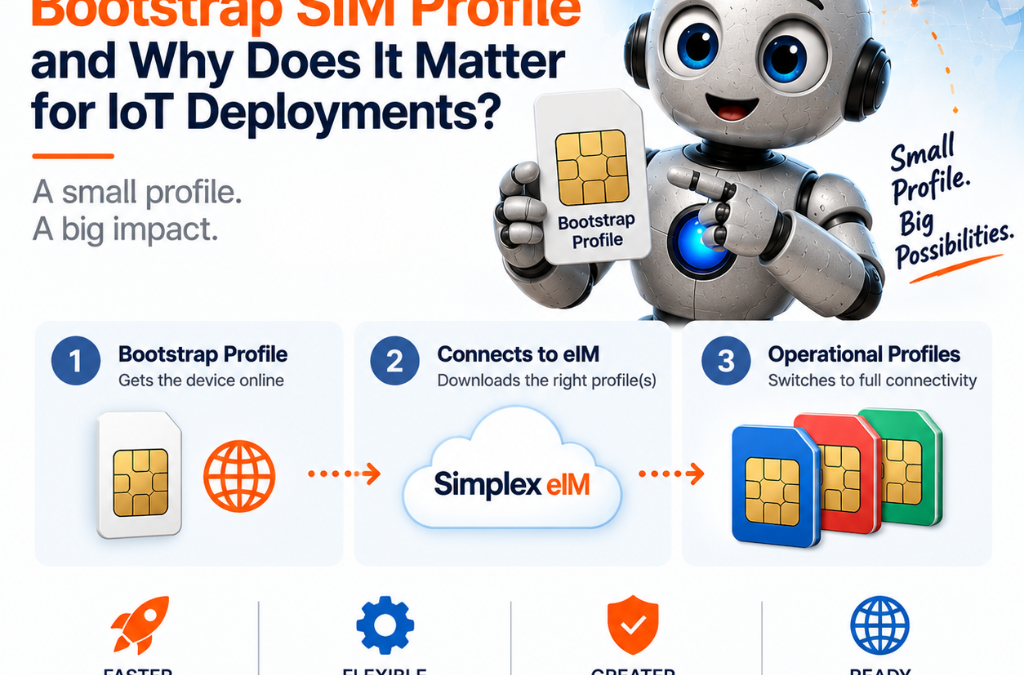
What Is a Bootstrap SIM Profile and Why Does It Matter for IoT Deployments?
The first connection an eSIM-enabled device ever makes happens before your platform knows it exists — and the bootstrap profile is what makes that possible.
A smart meter ships from a factory in Shenzhen to a utility substation in rural Montana. No technician is on site to configure it. No Wi-Fi password to enter. No QR code to scan. The moment the device powers on, it needs to reach a server, download its operational connectivity profile, and register itself on the network — all without human intervention. The bootstrap profile is what makes that sequence possible. It’s one of the most important concepts in eSIM deployments, and one of the least explained.
What a bootstrap profile is and how it works
A bootstrap profile — sometimes called a provisioning profile — is a minimal eSIM (electronic SIM) profile loaded onto an eUICC (Embedded Universal Integrated Circuit Card) during the SIM manufacturing process. It gives the device a first, basic cellular connection to reach the remote provisioning infrastructure, so it can download and activate its permanent operational profile over the air.
Think of it as a temporary key that opens just one door: the door to the provisioning server. The bootstrap profile isn’t meant to carry your application’s data traffic. It’s meant to carry a single, specific transaction — the download of the profile that will.
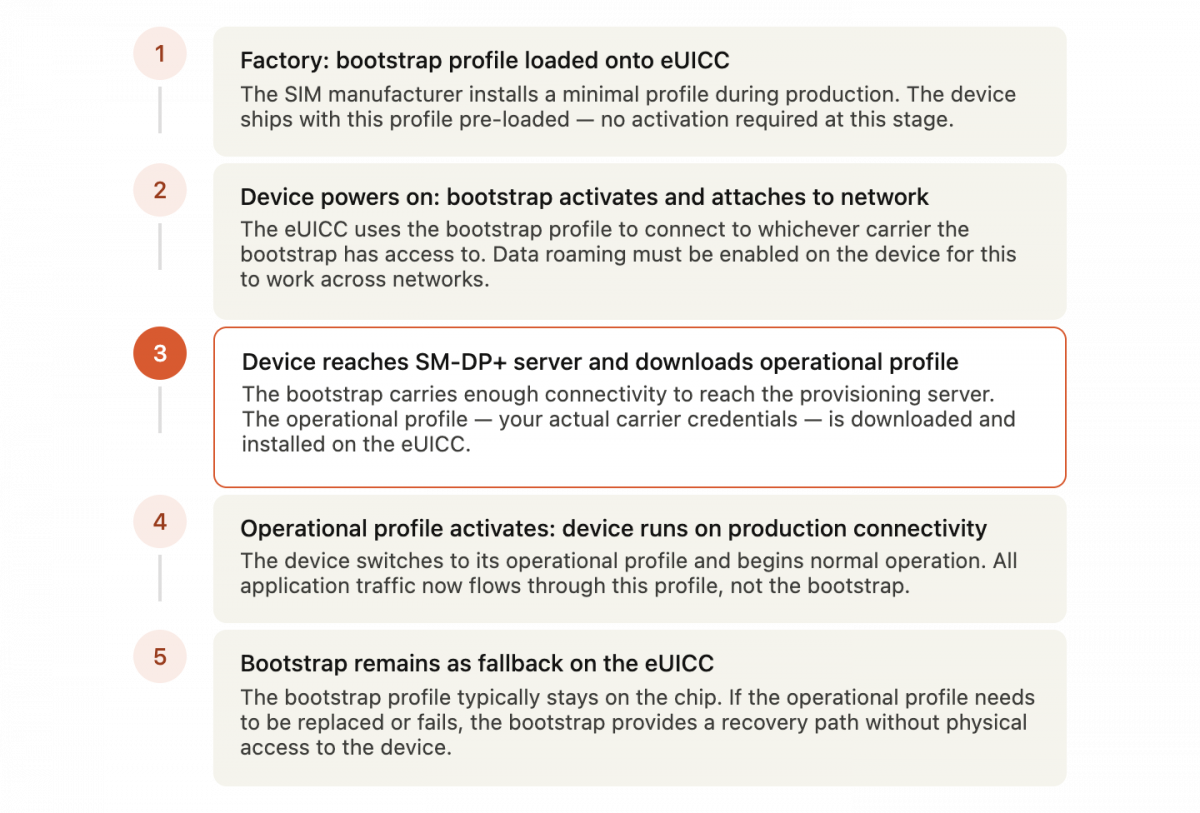
In a standard eSIM provisioning flow, here’s what happens: the device powers on, the bootstrap profile activates, the device connects to the cellular network with whatever carriers the bootstrap provides access to, it reaches the SM-DP+ server (the provisioning server that stores and manages eSIM profiles), downloads the operational profile assigned to it, and switches to that profile for all subsequent communication. From that point forward, the bootstrap profile typically remains on the eUICC as a fallback — available if the operational profile needs to be replaced or if something goes wrong.
The bootstrap profile is defined by which GSMA specification the SIM supports: SGP.02 for M2M devices, SGP.22 for consumer devices, or SGP.32, the newer standard built specifically for IoT. Each has a slightly different provisioning architecture, but the bootstrap concept is consistent across all three.
Figure 1 — Step sequence: how bootstrap fits into the eSIM provisioning flow
Why this matters specifically for IoT
Consumer eSIM activation on a smartphone is a manual process. You open settings, tap through a menu, scan a QR code, and confirm. There’s a human involved at every step. If something goes wrong, that human notices immediately and retries.
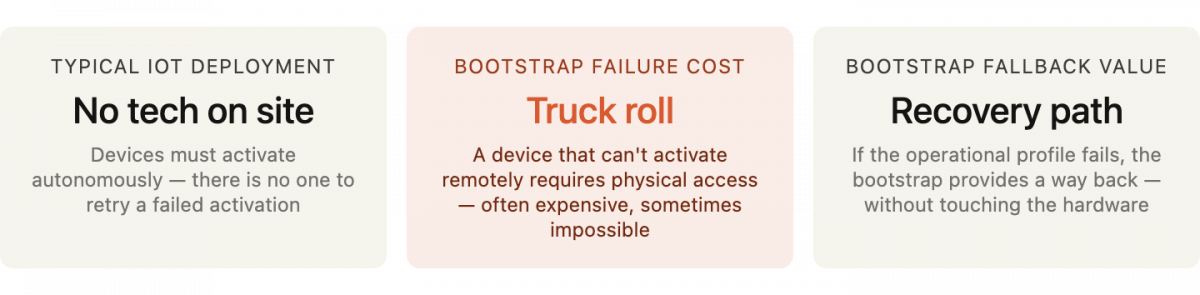
IoT deployments don’t work that way. Devices are often shipped directly to field locations — substations, irrigation sites, shipping containers, building rooftops — where no qualified technician is present and physical access after installation is difficult or impossible. The activation sequence has to complete autonomously, the first time, without anyone watching. The bootstrap profile is what enables that. It gives a factory-fresh device a cellular connection it can use to reach the provisioning infrastructure before it has any operator credentials of its own.
This is also why the bootstrap profile’s coverage matters. A bootstrap that only reaches a single carrier in a single country creates risk for devices deployed across regions or at sites where that carrier has poor signal. A well-designed bootstrap has broad enough network access — through roaming agreements or multi-carrier support — to connect reliably across the device’s likely deployment geography. If the bootstrap can’t attach to the network at the deployment location, the device can’t reach the provisioning server, and it can’t download its operational profile. It simply sits there, inert, with no easy recovery path.
For devices using SGP.32 — the current GSMA standard designed specifically for IoT — the bootstrap also enables the IPA (IoT Profile Assistant) to function. The IPA is the component that communicates between the eUICC and the EIM (eSIM IoT Manager) server, managing profile operations. Without an initial cellular connection from the bootstrap, that communication channel can’t open.
What can go wrong
The most common failure is a device that powers on, associates with a tower, but produces no data connection. This is often misdiagnosed as a coverage problem. In many cases, the real cause is a bootstrap issue — either data roaming is disabled on the device, blocking the bootstrap from attaching to a visited network, or the APN wasn’t configured correctly and the device has no route to the provisioning server even though it’s associated with the network.
A second failure mode is bootstrap expiry. Bootstrap profiles aren’t indefinite — they typically have validity windows, and devices sitting in a warehouse for longer than expected may arrive at a deployment site with an expired or limited bootstrap. This is particularly relevant for projects with long manufacturing-to-deployment cycles. Verifying bootstrap validity before bulk shipments go out is a check that’s easy to skip and painful to discover in the field.
Confusing the bootstrap with the operational profile is a third issue, usually a documentation or onboarding problem. Engineers who are new to eSIM sometimes assume the bootstrap is the production connectivity and configure their platform accordingly. When the device switches to its operational profile and behavior changes — different APN, different IP range, different network — unexpected errors surface that can take time to trace back to this source.
Finally, devices stuck on the bootstrap after deployment indicate that the operational profile download failed. This can happen because the SM-DP+ server wasn’t reachable, the profile wasn’t pre-loaded into the provisioning platform, or there was a mismatch between the device’s EID (eUICC Identifier) and the profile record. Catching this during a controlled trial SIM phase rather than during a full rollout is significantly cheaper.
Figure 2 — Stat callout: the stakes of unattended activation
What to do before your devices ship
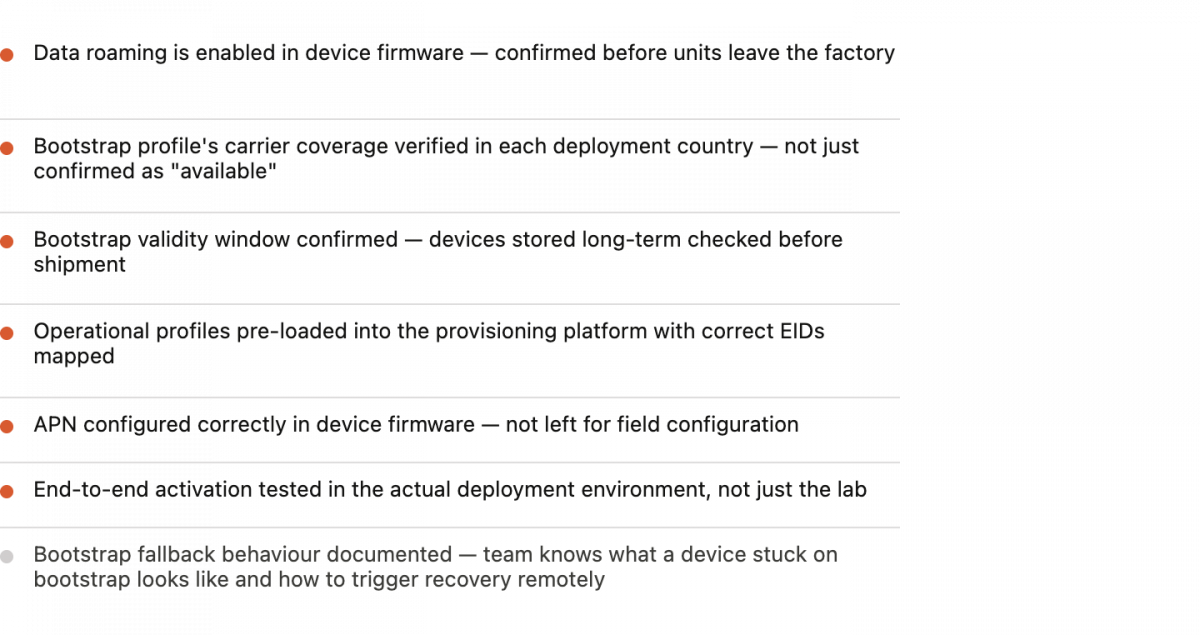
Three steps that prevent most bootstrap-related failures before they reach the field.
First, confirm data roaming is enabled in firmware before devices leave the warehouse. This is the single most common cause of bootstrap failure. The device associates with a tower but the bootstrap profile can’t attach across a visited network because roaming is off. Build this into your device image at the factory stage — it should never be a field configuration.
Second, verify the bootstrap’s coverage in your deployment region before committing to a SIM vendor. Ask specifically which carriers the bootstrap can access in each country where your devices will deploy. A bootstrap that relies on a single carrier creates a single point of failure at the most critical moment in the device’s lifecycle. Simplex’s xoSIM platform uses multi-carrier access that extends to the bootstrap layer, ensuring devices can attach from the point of first power-on regardless of which network is strongest at the deployment site.
Third, stage a small pilot batch at the actual deployment location before full rollout. Signal in a lab is not signal inside a metal enclosure on a rooftop in a rural area. Activating ten units in the field environment before shipping a thousand confirms the bootstrap works end-to-end under real conditions — coverage, routing, provisioning server reachability — and gives you time to address any issues without an active deployment depending on the answer.
Bootstrap problems are among the most frustrating in IoT deployments precisely because they happen at the worst possible moment: when devices are already in the field and human access is limited. Getting this right before deployment is almost always cheaper than resolving it after.
Figure 3 — Checklist: bootstrap verification before deployment
The bootstrap profile is easy to overlook because it’s invisible when it works. When it doesn’t, the failure happens at the worst possible moment — a deployed device that can’t activate, in a location you can’t easily reach. Understanding what it is, what it needs to work, and how to verify it before devices ship is the difference between a clean rollout and an expensive recovery operation. Explore Simplex’s eSIM solutions or get your IoT SIM to get started.
This article was curated by Jan Lattunen, CCO Simplex Wireless
About the Author: Jan Lattunen manages Sales and Marketing for Simplex Wireless. Jan has 20 years’ experience in working with SIM card technology and was involved in launching the eSIM in North America with major carriers and OEMs. His expertise in telecommunications is around SIM cards. On a personal note, Jan is a family man and avid cyclist with advocacy for safety in the roads. You can connect with Jan on https://linkedin.com/in/JanLattunen